

How to tell if your website is ranking well online
SEO
Key takeaways
- You can check that you’re getting organic traffic through to your website using Google Analytics.
- You can manually check how well your website is performing by typing industry-relevant keywords into a search engine.
- You can check your website is properly indexed by typing site:yourwebsite.com into Google’s search bar.
- Optimising your website so that it will rank for the keywords you want to target will bring huge rewards if done correctly. The first position can command a click-through rate twice that of position two.
Is your website ranking well online?
There are four possible answers to this question.
Yes. No. Don’t know. Don’t care.
Which answer do you give?
If you’re not sure, skip ahead to the section on how to tell if your website is ranking well online.
But for those who don’t really care, I’ve unpacked the business case for ensuring your website is ranking well below. It might surprise you how impactful ranking well can be for your business!
But first…
What do we mean by “ranking well”?
To be ranked well, your website should be ranked on the first page of the search engine results for at least some of your primary or secondary keywords.
A “keyword” is a phrase or query that a user types into a search engine to find services like yours. So, if you’re a cleaning company, your potential clients might be typing in things like “cleaning company near me” or “deep cleaning services”.
Primary (known as seed keywords) tend to be keywords that sum up the overall term for your service. For example “cleaning company”.
Secondary keywords are keywords that might describe particular services you deliver within that overall category. So, “upholstery cleaning”.
Why do you need to be ranked on the first page?
Because users only tend to look at the first page of results.
And where you’re positioned on that page can significantly affect the number of users that you get through to your website.
| Rank position | Average click-through rate |
| 1 | 39.8% |
| 2 | 18.7% |
| 3 | 10.2% |
| 4 | 7.2% |
| 5 | 5.1% |
| 6 | 4.4% |
| 7 | 3.0% |
| 8 | 2.1% |
| 9 | 1.9% |
| 10 | 1.6% |
If you’re positioned first in the list of organic results, then the click-through rate could be as high as 39.8%!
A click-through rate is the number of times a user clicks on a link compared with the number of times the link is shown. The higher the rate, the greater the proportion of users who have clicked through for that search query.
The click-through rate drops off quite quickly the lower down the page you’re positioned; the click-through rate for position 2 is half that of position 1.
Once on your website, not all visitors will convert into an enquiry. There’s a huge variation in the average conversion rate of websites based on factors such as industry, goal, and demographics of users.
Some say the average is between 2-5%, but if you’re in the B2B space it could be less.
How many leads can you expect if you rank first on the results page?
Let’s just take 2% as an average for the purposes of our calculation.
I’ve presumed that 1000 people type in a certain keyword, so there are 1000 impressions of the results page. I’ve then calculated how many people would click through based on where your website is positioned on the results page. I’ve then applied the 2% conversion rate and you should be able to see how many leads this turns into.
| Ranking position | Apply click-through rate. Out of 1000 users, how many will click through | Apply conversion rate. Out of these, how many will convert into an enquiry on your website | How many real leads would this be? |
| 1 | 389 | 7.78 | 7 |
| 2 | 187 | 3.74 | 3 |
| 3 | 102 | 2.04 | 2 |
| 4 | 72 | 1.44 | 1 |
| 5 | 51 | 1.02 | 1 |
| 6 | 44 | 0.88 | 0 |
You can see that based on the calculations on this page if you’re ranking first in the organic results, and if that keyword is worth 1000 users per month, then you can expect to get 7 leads from that keyword.
What is one lead worth to your business? Multiple that figure by 7 – that’s how much you could make from aiming to get position 1 for a keyword worth 1000 impressions a month.
If your website isn’t ranking at position 5 or above, there’s little chance of you winning a lead from this keyword.
There are a few things we can learn from this:
- The higher you rank, generally the more users you will get through to your website.
- The more users you get through to your website, generally the more leads you will get.
So, aiming to rank for as many keywords as possible is a good thing – but only if those keywords are relevant (i.e. are bringing the right users to your website) and are being used by a decent number of users.
For you to select the correct keywords, you need to understand your target audience (this is the term used to describe the people you want to target with your marketing efforts).
[Note – there are times when it’s appropriate to aim for lower-volume keywords, but this is beyond the scope of this blog, so I’ll pick this issue up in another blog sometime.]
How to tell if your website is ranking well online
Now we understand why it’s so important to rank well, we need to figure out how to check how well your website is doing.
There are a few things we need to check.
- Are you ranking for keywords associated with the services you provide?
- Has Google indexed your website?
- Are you getting traffic from the organic search results?
Let’s unpack how to do each of these things.
How to check you’re ranking for keywords associated with the services you provide
1. Discover your keywords
Firstly, we need to find out what keywords are being used by those looking for the services you provide.
Use a free keyword tool, such as Ryan Robinson’s keyword tool to search for keywords associated with your industry. You can put any industry or service into the search bar.
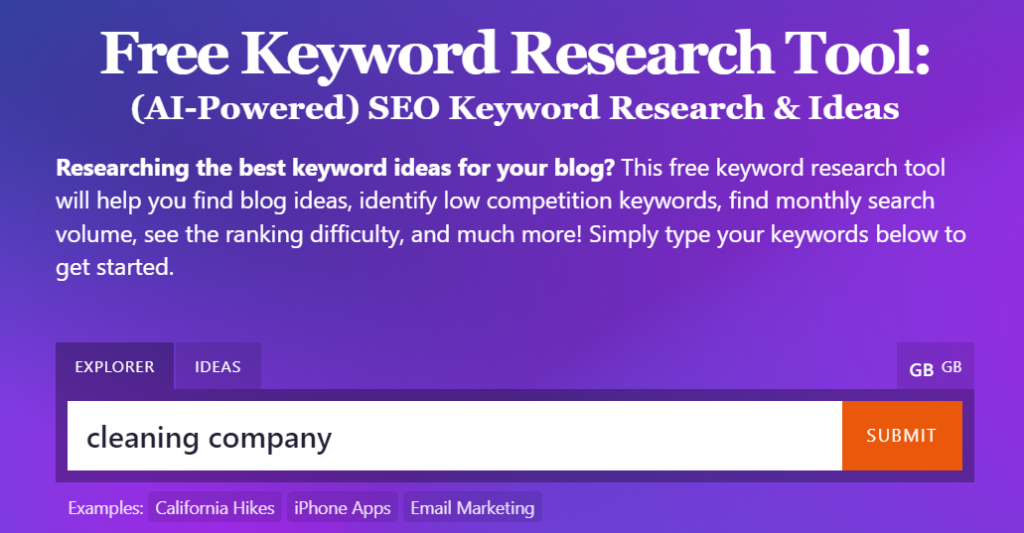
(Make sure you choose the right geographical region though by clicking on the country code just to the right of the search bar).
You’ll get a list of keywords that users are searching. The tool will even tell you how difficult they are to rank for, like this.

Choose one that you think represents your service, and includes your location, but isn’t too competitive.
We’ve got a more detailed description of how to do keyword research here.
2. See where you’re ranking
There are a couple of ways to do this.
The first technique is to manually check each keyword on your browser.
Open up a browser (I tend to use Chrome).
Browsers will store a lot of information about your searches, so you need to make sure you’re not “leading” the search engines and bringing up a false positive. So, open up an “incognito” window. This will hide your digital identity from the search engine and give a truly unbiased result.
Do this by clicking on the little three dots on the top right-hand corner of your browser.
Then click “New Incognito Window”. Like this:

Once the window has loaded, type your keyword into the search bar.
You’ll get a list of results for your keyword and you’ll be able to scroll down to see where your company sits.
Alternatively, you could use ahrefs free tracker. You need to put in the keyword, your website’s URL and select the correct geographical region.

It will give you a national average. This might not be so useful if you’re a regional or local business.
3. Repeat
Repeat steps 1-2 for as many keywords as you want. Aim to build a spreadsheet so that you can track what position your website is ranking for each keyword.
This is a laborious process. There are tools that you can use to track keywords automatically.
Semrush is our tool of choice, and you can try it for free. You can use Semrush’s Keyword Magic Tool to discover your keywords and then add them to the position tracker tool so that Semrush can determine where you’re ranking for each keyword.
How to tell if Google has indexed your website
When you type a keyword into Google, what you see is a list of websites (or webpages) that have been indexed by Google. This means that Google has discovered those websites and has stored them within its database.
Google applies an algorithm to determine where your website will be ranked when a user conducts a search and generates a list of its stored websites.
It doesn’t go looking across the live internet for results whenever you do a search, it pulls its results from its database.
Although the major search engines do lots of work to discover and understand the vast number of websites online automatically, they are not omniscient.
This means that even if your website has been around for a long time, it might not have been discovered by Google.
Or, the domain might have been discovered, but the individual pages within it might not have been.
So, it’s important to check that your website has been indexed properly.
Use Google Search
The simplest way is to go to Google and type “site:yourwebsite.com” into the search bar (replace yourwebsite.com with your actual domain name).
If your site has been indexed, you should see a list of pages from your website in the search results.
If no results appear, it’s likely that your site has not been indexed yet. Users won’t be able to find your website if this is the case.
How to tell if you’re getting traffic from the organic search results.
This can get very tricky depending on what data you want to surface.
Some applications will give you estimates based on how many keywords your website has, but the only truly authentic way you can determine how many users are coming through to your website from organic search is by tracking it.
Use Google Analytics
Google Analytics is a free program that allows you to track the traffic (users) coming into your website and what they do when they’re looking at it.
How to set up a Google Analytics account
- If you don’t already have a Google account, you’ll need to create one. If you have a Google account, you can use it to sign in to Google Analytics.
- Then, go to the Google Analytics website and sign in with your Google account.
- Once signed in, click on the “Start measuring” button to begin setting up a new Google Analytics account.
- Fill in the account name. You can use your company or website name. Google Analytics will ask you what you want to measure (Web, Apps, or both). For website tracking, select “Web”.
- You’ll be prompted to set up a “property”. This is a term for “website”. Enter the name of your website and select the appropriate time zone and currency. This information will be used for reporting purposes.
- Adjust your data-sharing settings according to your preference. These settings determine how Google can use your data.
- After providing your website name, you’ll be prompted to enter your website URL. Be sure to select the correct protocol (https).
- Once all the information is filled in, click on the “Create” button. Google will generate a unique tracking ID and a global site tag (gtag.js) for your website. This is a piece of JavaScript code (global site tag) that you need to add to every page on your website.
How to implement tracking on your website
- Have your web developer add your global site tag to your website. This code should be placed in the <head> section of your HTML, ideally right after the opening <head> tag.
- It takes a few days for the data to populate, but then you can open up your Google Analytics account and view the amount of traffic coming into your website.
How to check where your traffic is coming from
- Using the menu, you can find out where the traffic is coming from. Click:
- Reports
- Acquisition
- Traffic acquisition
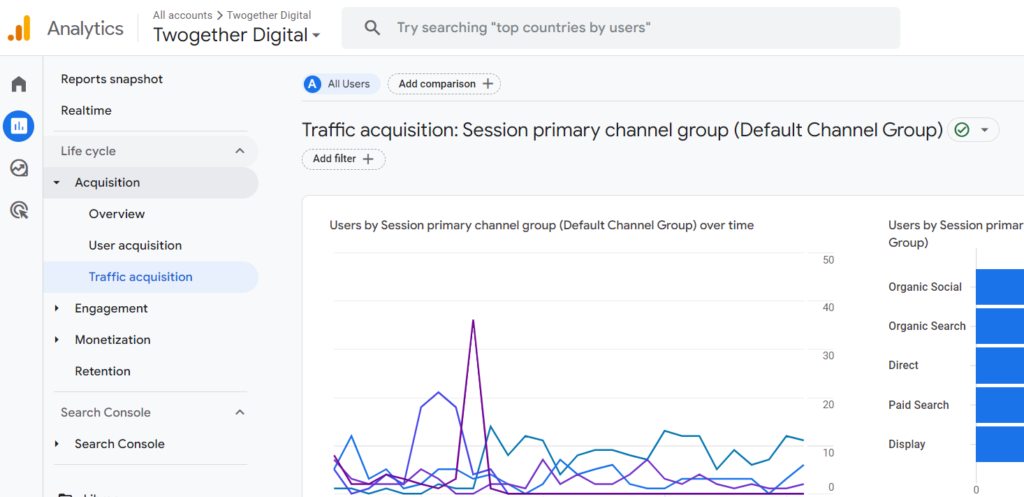
Google Analytics will automatically break down where your traffic comes from. Look for the category called “organic search”. This is the amount of traffic that is coming from search engines.
Know your keywords so you can rank well online
Ranking well online doesn’t just mean getting plenty of leads from your PPC campaign. It means that your website is ranking on the first page for several keywords that are pertinent to your niche and services.
There are a few ways that you can check that your website is ranking well.
You can check that you’re getting organic traffic through to your website using a Google Analytics account. You can also check your website is properly indexed by typing site:yourwebsite.com into the search bar and checking all the different web pages that come up.
Ultimately, you need to know what keywords you want to rank for and check whether your website ranks for that term. This requires keyword research.
But you also need to understand your target audience to know what keywords they might be searching for. After all, if you don’t get the right users to the website, they won’t convert into leads.
Optimising your website so that it will rank for the keywords you want to target will bring huge rewards if done correctly. The coveted first position can command a click-through rate twice that of position two.
What’s one lead worth to you? Imagine if you managed to get the top spot for one valuable keyword. That’s the power of ranking well online. That’s the power of SEO.
Website audit service
If all this sounds too daunting, let us take the hard work off you.
Our website audit service helps us determine how well your website is ranking online, and how well it is performing in comparison to that of your competitors. The service allows us to dive deep “under the hood” of your website to determine the reasons behind what we find and offers a list of recommendations to help you improve your website’s online visibility.
Not only that, but this service gives recommendations on the quality of your website’s design and content, allowing you to ensure your website is doing everything it can to encourage users to convert into enquiries.